
A safe that beeps but won’t open is usually caused by low or dead batteries, an incorrect PIN entered too many times (triggering lockout mode), a jammed bolt mechanism, or a malfunctioning keypad. Start by replacing the batteries. This solves the problem about 70% of the time.
Why Your Safe Beeps in the First Place?
Before jumping into fixes, it helps to understand what those beeps actually mean.
Electronic safes communicate through beep patterns. A single beep usually confirms a button press. Multiple quick beeps often signal an error. A long continuous beep might indicate lockout mode. The specific pattern varies by brand SentrySafe, Honeywell, Vaultek, and others each have their own beep language.
The safe isn’t broken just because it’s beeping. It’s talking to you. Your job is to figure out what it’s saying.
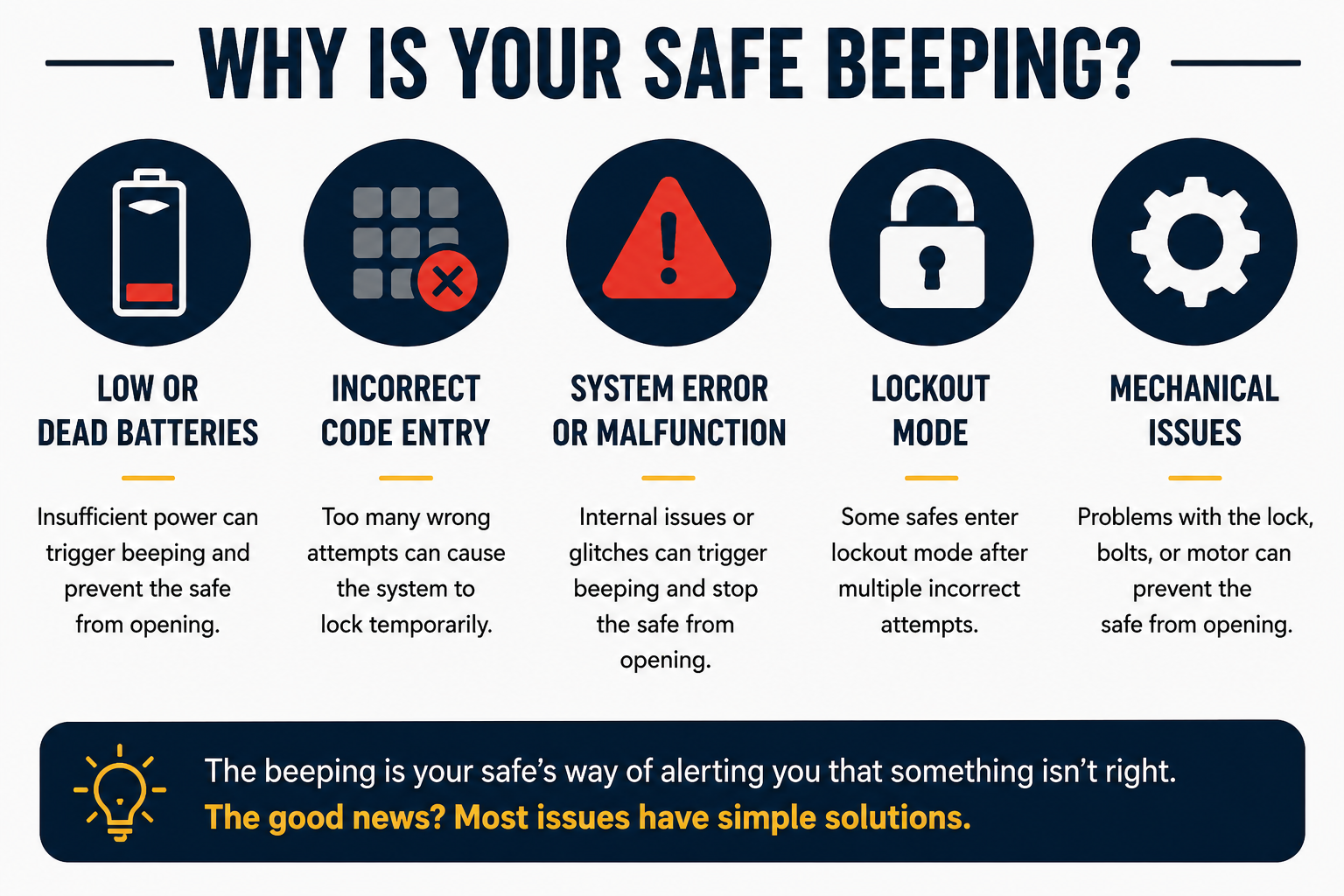
The most common reason: low or dead batteries
This is the number one cause, by a significant margin.
Electronic safes run on AA or 9V batteries (check your manual for which). When the battery level drops, the safe does something that feels counterintuitive: it keeps accepting your code and beeping, but it doesn’t have enough power actually to drive the motor that retracts the bolts.
So the keypad lights up, registers your input, beeps, and then nothing happens. The bolts don’t move.
How to fix it:
Most safes have an emergency battery contact on the outside of the door usually a port near the keypad or on the front panel. You press a 9V battery directly against these two terminals, hold it there firmly, and then enter your code while maintaining that contact. The external battery provides just enough power to open the door.
Once it’s open, replace all internal batteries immediately. Don’t put old batteries back in. Use fresh alkaline batteries; avoid rechargeable ones, as they can deliver inconsistent voltage.
How to know if this is your problem: Your safe probably gave you low-battery warnings before this happened a series of rapid beeps when closing, or a warning light. If you ignored those, this is almost certainly your issue.
Lockout Mode: When Too Many Wrong Attempts Trigger a Freeze
Almost every electronic safe has a built-in security feature that locks you out after a certain number of incorrect attempts. This is intentional it’s designed to stop someone from guessing your combination.
Depending on the brand and model, this might kick in after 3, 5, or 10 wrong entries. When it does, the safe enters penalty mode and won’t respond to inputs for a set period, anywhere from 5 minutes to 20 minutes, sometimes longer.
During lockout mode, pressing buttons just makes the safe beep. It’s not broken. It’s waiting.
How to fix it:
Wait it out. The lockout period will end on its own. Check your manual for the exact duration; most SentrySafe models lock you out for 20 minutes, while Honeywell safes vary by model.
While you’re waiting, make sure you’re entering the correct code. It’s surprisingly common to have the correct combination slightly wrong a transposed digit, an extra zero, or a habit of pressing the # key in the wrong sequence.
After the lockout clears, enter your code slowly and deliberately. Don’t rush.
If you don’t know how long the lockout lasts, just wait 30 minutes and try again. That covers most models.
Wrong Code Entry Sequence
This one trips people up more than you’d think.
Many electronic safes require you to enter your code in a specific format. Some need you to press a dedicated button first (like * or #) before entering your PIN. Others require you to hit Enter or # after the last digit. If you skip this step, the safe will beep to acknowledge your button presses but won’t open.
How to fix it:
Pull out your manual (or find it online using your model number). Look up the correct entry procedure. For most SentrySafe models, the sequence is:
- Press the red button
- Enter your code
- Press the green button (or wait for the tone)
- Turn the handle
If you’ve been skipping a step, even a small one that’s your problem.
The override key isn’t working either
Some people try the override key when the keypad fails, only to find that it doesn’t work either. This is a separate issue from the electronic problem.
If the mechanical key won’t turn, the lock cylinder may be jammed, or the key may not be the correct override key for your specific safe. Many safes come with two keys, and they’re model-specific; a key from a different SentrySafe model, for example, won’t work.
How to fix it:
Check that you’re using the correct key for your model. Try inserting it very slowly and applying gentle turning pressure while wiggling it slightly. If the key turns but the door still won’t open, the bolt mechanism itself may be the issue (see the section below).
If the key doesn’t turn at all, don’t force it. You could break the key off inside the lock.
Jammed or Misaligned Bolt Mechanism
Sometimes the issue has nothing to do with the electronics or your code. The bolt — the physical metal bar that locks the door — gets stuck.
This can happen if:
- The safe was overfilled, and the door is under pressure
- Something inside shifted and was pressing against the door
- The safe was knocked or moved recently
- Humidity or temperature changes caused the metal to expand slightly
When the bolt is jammed, the electronic mechanism accepts your code and tries to retract the bolt, but it physically can’t move. The motor strains, and you might hear a grinding or clicking sound in addition to the beep.
How to fix it:
Try this before calling a locksmith. After entering your correct code, push firmly on the door itself while simultaneously pulling the handle. You’re trying to relieve any side pressure on the bolt. Sometimes the door is slightly bowed from overfilling, and a firm push while turning the handle is all it needs.
Also, try pushing the door in different directions up, down, slightly left, and right while turning the handle. You’re looking for the angle where the bolt has the least resistance.
If you hear a motor trying to work but the bolt is not moving, give the door a firm smack with the palm of your hand (not a punch — you could damage the keypad). A light shock can sometimes unstick a bolt that’s just barely hung up.
Keypad malfunction or damaged wiring
Less common, but it happens. The keypad itself can fail. This might be from:
- Moisture is getting into the keypad
- Physical damage to the keypad
- A loose wire connection between the keypad and the lock mechanism
- A keypad that’s simply worn out from years of use
If the keypad buttons feel mushy, some buttons don’t register, or the display looks dim or erratic, that’s a hardware problem.
How to fix it:
First, try replacing the batteries anyway. Weak batteries can cause keypad malfunctions that mimic hardware failure.
If fresh batteries don’t help, and you’re still under warranty, contact the manufacturer. SentrySafe, for example, has a customer service line and will often replace defective units.
If you’re out of warranty, a locksmith who specializes in safes can diagnose whether it’s the keypad, the wiring, or the lock mechanism. Getting the safe cracked open professionally is less expensive than you’d think usually between $50 and $150, depending on your area.
Safe Won’t Open After Changing the Battery
This is a specific scenario that confuses a lot of people. You changed the batteries yourself, and now the safe won’t open. What happened?
The most likely answer: you installed the batteries with the wrong polarity (positive and negative terminals reversed), or one of the batteries is slightly loose in the compartment and isn’t making full contact.
How to fix it:
Open the battery compartment again. Remove all batteries. Check that the polarity markings (+ and -) match up with the labels inside the compartment. Reinstall them firmly, making sure each one clicks fully into place.
Then try your code again. This solves the problem in the vast majority of cases.
Still Won’t open? When to Call a Locksmith.
If you’ve tried everything above and your safe still won’t open, it’s time to call a safe technician — not a regular locksmith, but one who specifically works with safes.
Look for a locksmith that advertises safe cracking or safe opening services. They have the right tools and won’t damage your safe. The cost is reasonable, and they can usually diagnose the exact problem while they’re there.
Don’t try to drill or pry open the safe yourself. You risk destroying the contents, permanently damaging the safe, and potentially voiding any insurance claims if the safe was part of your homeowner’s policy.
How to Prevent This from Happening Again
Once you’re back inside your safe, take a few steps to make sure this doesn’t repeat:
Change your batteries proactively. Don’t wait for the low-battery warning. Change them once a year on a set date a lot of people do it when the clocks change in the fall. Write the date on a piece of tape and stick it inside the battery compartment.
Test your override key regularly. Every six months, get the key out and confirm it works. Don’t wait until an emergency to discover the key is bent or mismatched.
Don’t overfill the safe. If you’re cramming documents and valuables in and the door has to be forced closed, you’re putting stress on the bolt every time. Eventually, it’ll jam.
Keep the keypad dry. Avoid placing your safe in a bathroom or basement where condensation is common. Humidity is the enemy of electronic components.
Write down your combination. Store it somewhere secure but separate from the safe itself — a trusted family member’s home, a bank deposit box, or a fireproof document envelope. The safest thing is to have a backup plan before you ever need it.
Frequently Asked Questions
Q: My safe is beeping three times and won’t open. What does that mean?
Three beeps on most electronic safes signal an incorrect code entry. Some models use three beeps specifically to indicate lockout mode is activating. Try waiting 20–30 minutes and re-entering your code carefully. If you’re unsure of your combination, the manual override key is your next step.
Q: How long does lockout mode last on a SentrySafe?
Most SentrySafe models lock out for 20 minutes after three incorrect attempts. During this time, the safe won’t respond to code entries. After 20 minutes, you’ll hear a single beep indicating you can try again. Some models have longer lockout periods — check your specific model’s manual for confirmation.
Q: My safe beeps once and the light flashes red. Is it the battery?
A single red flash with one beep is typically the low-battery warning on models like SentrySafe and First Alert. Replace the batteries right away. If you continue ignoring it, the safe will eventually reach the point where it beeps, but the motor doesn’t have enough power to open the door.
Q: Can I open my safe if the keypad is completely dead?
Yes, most electronic safes include a physical key override for exactly this situation. The keyhole is usually hidden behind a panel near the keypad or underneath the door handle. If you don’t have the override key, a qualified safe technician can open it without permanent damage.
Q: Why did my safe stop working after I moved it?
Moving a safe can shift internal components, and in some cases, the jolt of moving can cause the bolt to shift slightly out of alignment. Try the technique described above: push on the door from different angles while turning the handle. If that doesn’t work, check the batteries, then call a technician.
Q: Is a safe that beeps but won’t open still covered under warranty?
Usually yes, if the cause is a manufacturing defect in the electronic components. Contact the manufacturer with your model number and purchase date. SentrySafe, for example, offers a one-year warranty on electronic components and a lifetime warranty on the fire protection. Keep your receipt or order confirmation.
Our Recommendation
If your safe is beeping but won’t open right now, start with fresh batteries and the external battery trick that fixes it most of the time. If that doesn’t work, check for lockout mode, then verify your entry sequence, then try the handle-pressure technique for jammed bolts.
If none of those work, don’t force it. Call a safe technician. The cost is worth it compared to the risk of damaging your safe or its contents.
And once it’s open, consider upgrading to a safe that gives clearer battery warnings and has a more reliable mechanism. Safes with dual-power options, electronic plus reliable mechanical backup, give you the best of both worlds.
